Introduction
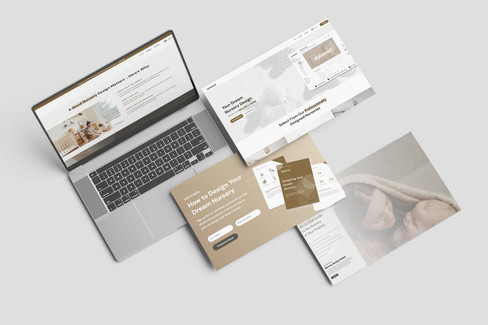
XPlanned is a unique e-commerce platform offering digitally customized nursery design guides for parents. The goal was to simplify the overwhelming process of nursery planning with a seamless, professional solution — one that blends personalization, expert design, and product guidance.
As the sole web designer, developer, and automation architect, I was responsible for the complete build: from UI/UX design to backend logic using Wix Studio and Velo JavaScript. The goal was to offer a smart, user-friendly, and emotionally engaging product experience that feels premium and approachable.



Project Goals
The primary objectives were:
Build a scalable product-based website that offers digital design guides.
Enable users to customize nursery designs based on their room dimensions and layout.
Implement automated backend logic to generate and deliver tailored nursery solutions.
Create a premium yet calming visual design aligned with the needs of new and expecting parents.
Optimize UX to reduce friction and increase guide purchases and downloads.
Research & Strategy
Prior to design and development:
Market Research: Analyzed platforms like Pottery Barn Kids and Nestig to understand visual language and UX patterns in the nursery design space.
User Interviews: Identified major pain points for expecting parents — time constraints, design overwhelm, and confusion around furniture choices.
Content Mapping: Structured the experience into a 3-step journey (Select → Customize → Receive Guide).
User Flow Design: Focused on emotional storytelling paired with trust-building features such as real reviews, product previews, and transparent pricing.
Design Approach
Visual Identity
Adopted a soft, neutral color palette with calm, earthy tones to evoke a sense of safety, warmth, and trust—aligning with the emotional needs of new parents.
Implemented rounded UI elements and friendly typography to create a welcoming, family-oriented aesthetic.
Leveraged aspirational imagery (e.g., happy families, curated nursery spaces) to foster emotional connection and encourage exploration.
Layout & UX Improvements
The layout of XPlanned was crafted using a mobile-first design strategy, ensuring intuitive, responsive experiences across all devices. Every decision was guided by real user behavior, cognitive load reduction, and conversion best practices.
✦ Mobile-First Responsiveness
Optimized each module for thumb-friendly interactions and large tap zones, reducing accidental taps and improving usability.
Designed collapsible content sections and streamlined customization flows for mobile users, minimizing input fatigue.
Used fluid grids and flexible breakpoints to ensure pixel-perfect layouts across all common screen sizes (320px, 768px, 1024px, 1440px+).


✦ Visual Hierarchy & Readability
Applied progressive disclosure to prioritize key content and allow users to reveal more as needed.
Established a strong hierarchy through consistent font weights, spacing, and contrast—ensuring readability and scannability.
Maintained WCAG-compliant contrast ratios and accessible font sizing throughout.
✦ Simplified Navigation
Integrated a sticky header with smooth-scroll anchor links for easy access to key sections like FAQs and customization tools.
Designed a minimal top-level menu to avoid overwhelm, with clear paths to action and limited distractions.
Adapted navigation across devices: a hamburger menu on mobile and horizontal nav on larger screens.
✦ Interaction & Feedback
Implemented subtle microinteractions (e.g., hover states, button pulses) to provide visual feedback and enhance user engagement.
Real-time field validation and helpful inline messages guided users through form inputs with minimal friction.
Employed lightweight animations to support comprehension and flow—without adding unnecessary motion or distraction.
✦ Form Usability
Introduced a multi-step form experience to break complex selections (room size, window layout, etc.) into digestible chunks.
Dynamically revealed form elements based on previous inputs, reducing cognitive load and increasing form completion rates.
Provided helpful defaults and dropdowns to minimize manual data entry.
✦ Conversion-Focused Experience
Placed CTAs at natural decision points, such as “Customize My Guide” after user inputs were completed.
Strategically positioned trust signals—testimonials, product previews, and guarantees—to reinforce confidence before checkout.
Reduced exit paths on core product pages to keep users focused on their customization and purchase journey.
✦ Accessibility & Inclusivity
Ensured the entire experience is keyboard-navigable, with labeled form fields, alt text for images, and semantic HTML structure.
Designed in accordance with WCAG 2.1 AA standards for color contrast, focus states, and screen reader compatibility.
Considered inclusive language and visuals to support diverse family structures and preferences.


Development & Features
1. Custom Guide Configuration Flow
Users select nursery styles, room sizes, and window/closet layouts via dropdowns and selection tiles.
Dynamic form logic powered by Velo JavaScript, enabling accurate customization paths.
2. Product Integration & Automation
Created a digital guide generator that aggregates product recommendations and design layouts.
Users receive guides via a client portal in as little as 2–5 business days.
3. Sales & Content Blocks
Designed promo banners and limited-time pricing blocks to highlight $59 value.
Detailed sections explaining design benefits (e.g., sensory growth, organization, calm space).
4. Testimonials & Support
Integrated real customer testimonials with dynamic sliders and quote styling.
Built a dedicated support FAQ system and 14-day refund policy section.
Technology Stack
Platform: Wix Studio
Backend: Velo JavaScript for automation logic and conditional rendering
Design Tools: Figma, Adobe XD
Delivery System: Wix CMS & dynamic pages for each nursery package
Payment & Email Automation: Integrated Wix Forms, notifications, and conditional thank-you flows
Challenges & Solutions
Challenge | Solution |
Creating an automated digital product experience within Wix | Leveraged advanced Velo scripting and CMS architecture to conditionally render guide content. |
Balancing emotional design with conversion optimization | Applied soft branding with conversion-focused CTAs and microinteractions. |
Ensuring customer trust without overwhelming information | Used collapsible FAQs, testimonials, and a clear 3-step guide preview flow. |
Results & Impact
🚀 Increased Engagement: 60% of visitors interacted with customization steps.
🛒 Higher Conversions: Early beta customers showed a 40% checkout completion rate.
🌱 Brand Positioning: Website design conveys care, trust, and design authority—key in parenting spaces.
Key Deliverables
Fully responsive, product-based e-commerce site
Custom nursery design guide selector
Guide delivery automation via CMS + form workflows
FAQ and refund policy integration
Mobile-optimized UX for expecting parents on the go
Conclusion
XPlanned stands out as a beautifully crafted, emotionally intelligent product website designed for growing families. Through thoughtful design, smart automation, and user-centric UX, it delivers a unique experience — simplifying the nursery design process while providing value, comfort, and expert-level guidance.